DealMachine Alternatives (2026): Best Options for Real Estate Investors (By Workflow)

If you’re searching for DealMachine alternatives, you’re usually not asking “what’s better?” — you’re asking what fits my workflow.

DealMachine is strongest when your lead source is driving for dollars (local) and you want a simple field system: route → pin → contact → repeat.

But if your model is list stacking + skip tracing + campaigns, virtual canvassing, or follow-up execution, there are better fits depending on what you’re trying to build.


Quick verdict

  • Stay with DealMachine if your main lead source is local D4D and you want the cleanest day-to-day field workflow.
  • Choose BatchLeads if you want list building + skip tracing + outbound campaigns in one platform (scale workflow).
  • Choose PropStream if your priority is investor research + motivated seller filters + list pulling (data workflow).
  • Add REsimpli if your bottleneck is follow-up execution (CRM workflow) after you source leads.

Disclosure: Some links on this page are affiliate links, which means we may earn a commission at no extra cost to you. I only recommend tools I’d use to run an investor deal flow. See our Affiliate Disclosure: /affiliate-disclosure


If you’re comparing the main sourcing tools, these help you decide faster:


DealMachine alternatives: choose by workflow

The fastest way to pick an alternative is to decide what you’re optimizing for:

  • Local D4D execution: route tracking + frictionless pinning (DealMachine still wins most of the time)
  • Scale + outreach: list building + skip tracing + dial/text campaigns (BatchLeads)
  • Research + list pulling: motivated seller filters + owner data + exports (PropStream)
  • Follow-up execution: pipeline + tasks + texting/calling + accountability (REsimpli)

Side-by-side alternatives table

ToolBest forWhy it winsWatch-outsBest next step
DealMachineLocal driving for dollars (D4D)Clean route tracking + frictionless pinning for field executionNot built around list stacking + campaignsTry DealMachine
BatchLeadsScale + outreach-in-one-placeList building + skip tracing + outbound campaigns + pipeline toolsCan feel heavy if you only do true local D4DTry BatchLeads
PropStreamInvestor research + list buildingStrong filters + property/owner research + list exportsNot a full follow-up execution system for most teamsTry PropStream
REsimpliFollow-up execution (CRM)Investor-first pipeline + tasks + texting/calling + accountabilityNot a sourcing platform by itselfTry REsimpli

When you should not replace DealMachine

DealMachine is hard to beat if you’re:

  • Driving weekly (or daily) and want clean route coverage
  • Running a simple “see it → add it → contact it” field workflow
  • Solo or small team where speed + simplicity matters more than a giant platform

If that’s you, the best “alternative” is often keeping DealMachine and improving your follow-up system (CRM + sequences).


Best DealMachine alternatives (quick picks)

Best for scale + outreach-in-one-place: BatchLeads
Best for investor research + list building: PropStream
Best for CRM follow-up execution: REsimpli


Alternative #1: BatchLeads (scale + outreach)

Pick BatchLeads when your business is shaped like:
lists → skip trace → outbound → pipeline → repeat.

It’s typically the better “DealMachine alternative” if you’re not actually driving neighborhoods yourself and you want a platform built around scaling outbound.

Best for

  • Virtual canvassing / multi-market sourcing
  • List stacking and list building workflows
  • Skip tracing + campaigns in one place

Best next step:

(And if you’re comparing directly, use: DealMachine vs BatchLeads)


Alternative #2: PropStream (research + list building)

Pick PropStream when your bottleneck is finding the right list and you need:
filters, comps, owner info, and reliable exporting for outbound.

It’s a strong choice if your model is “data-driven sourcing” rather than field-first D4D.

Best for

  • Motivated seller research + list pulls
  • Building targeted lists (then working them via outreach/CRM)

Best next step:

(If you want the price plan breakdown: PropStream Pricing)


Alternative #3: REsimpli (follow-up execution)

REsimpli is not a “DealMachine replacement” for sourcing — it’s the system you add when your issue is what happens after the lead is captured.

If you’re missing deals because follow-up is inconsistent, REsimpli is often the highest ROI move.

Best for

  • Small teams doing consistent outbound
  • Pipeline clarity + accountability
  • Text/call tracking + tasks + follow-up cadence

Best next step:

(If you want the deep dive: REsimpli Review)


Other options (non-platform picks)

If you’re looking for a narrower tool (not a full platform):

  • If your issue is follow-up scripts and what to say next: start with your CRM workflow pages (we’ll build these soon)
  • If your issue is choosing the best D4D setup: use Best Driving for Dollars App

Starter stack (solo investor)

Growth stack (team + consistent outbound)

  • BatchLeads for list building + outreach workflows
  • Add REsimpli when you need cleaner accountability + follow-up execution

No matter which lead source you use, these AI scripts for motivated seller calls can help with outreach.


FAQs

What is the closest alternative to DealMachine for D4D?
If your main lead source is local D4D, DealMachine is still usually the cleanest day-to-day. “Alternatives” tend to win when your workflow shifts toward lists + campaigns or research-first sourcing.

Is BatchLeads better than DealMachine?
Not universally. BatchLeads is often better for scaled outbound workflows. DealMachine is often better for boots-on-the-ground D4D execution.

Is PropStream a DealMachine alternative?
It can be, but it’s more of a research + list building platform than a pure field D4D workflow.

Can I use DealMachine with a CRM?
Yes — many operators use DealMachine for sourcing and a CRM like REsimpli for follow-up execution as volume grows.


Sources:

PropStream Alternatives (2026): Best Options for Investors (By Goal)

If you’re searching for PropStream alternatives, you’re usually in one of these situations:

  • You want better list building + outreach in one place
  • You’re doing driving for dollars and need a tighter field workflow
  • You need follow-up and pipeline execution more than “more data”
  • You want a tool that fits your exact deal flow (local vs virtual, solo vs team)

PropStream is strong for investor research and lead lists — but it isn’t automatically the best fit for every acquisition model. This guide breaks down the best alternatives by use case, so you can choose the tool that matches how you actually source and convert deals.


Quick verdict

Choose PropStream if you want investor data, lead filtering, and built-in analysis tools in one place.
Choose BatchLeads if you want list building + skip tracing + outbound campaigns in a more “one platform” style.
Choose DealMachine if your core lead source is boots-on-the-ground D4D and you want the cleanest field workflow.
Choose REsimpli if your real bottleneck is follow-up execution (pipeline, tasks, texting/calling, accountability).

PropStream is still a strong option for investors who want list building, lead filtering, and now faster AI-assisted deal analysis in one workflow. But the right alternative depends on whether your real bottleneck is driving for dollars, outbound campaigns, CRM follow-up, or simpler operations.

Primary recommendation for most investors: Pick the tool that matches your lead source, then make follow-up non-negotiable. That’s where deals are won.


Disclosure: Some links on this page are affiliate links, which means we may earn a commission at no extra cost to you. I only recommend tools I’d use to run an investor deal flow. See our Affiliate Disclosure: /affiliate-disclosure/


What “PropStream alternative” should mean (choose by workflow)

Most investors don’t need “more features.” They need a tool that matches their workflow:

  • Local acquisition (D4D) → route tracking + fast lead capture matters
  • Virtual acquisition (multi-market) → filtering, list stacking, and VA workflows matter
  • High outbound volume → skip tracing + campaigns + pipeline matters
  • Lead conversion → CRM follow-up systems matter more than any data tool

So instead of asking “What’s better than PropStream?”, ask:
What’s better for the way I actually get deals?

Before you switch, read our full PropStream review to see where it still fits best.


Side-by-side comparison table

ToolBest forWhy it winsWatch-outsBest next step
PropStreamInvestor research + list buildingStrong all-around sourcing platform for motivated seller research + list pullsNot a full follow-up execution system for most teamsTry PropStream
BatchLeadsList building + outreach-in-one-placeDesigned for scaling outbound with list building + skip tracing + campaignsIf you only do true local D4D it can feel heavier than neededSee BatchLeads
DealMachineDriving for Dollars (local)Clean field workflow: route tracking + pinning + simple day-to-day executionNot the best fit if your whole model is list stacking + campaignsSee DealMachine
REsimpliFollow-up + investor CRM executionInvestor-first CRM: pipeline + tasks + texting/calling + accountabilityIf you want enterprise customization you’ll need a heavier CRMTry REsimpli

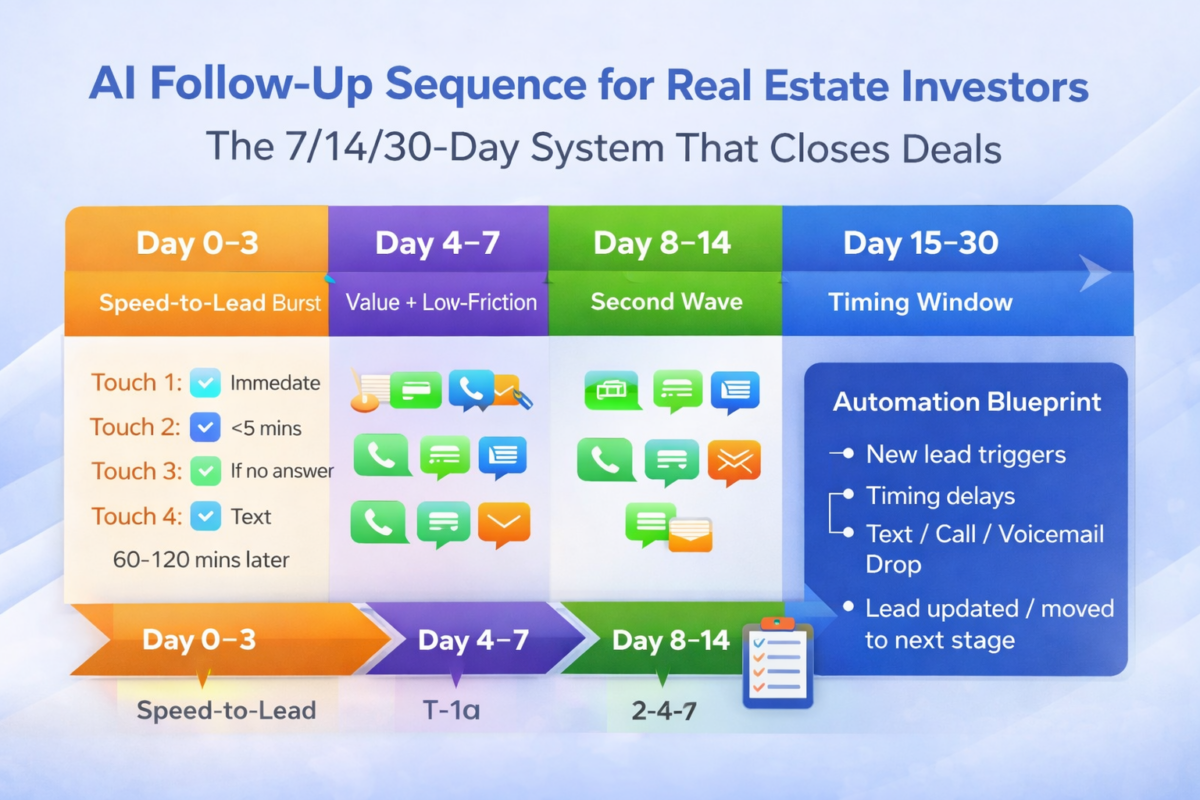
No matter which tool you pick, this is how you convert the leads: 7/14/30-day follow-up system: /ai-follow-up-sequence-real-estate-investors/

For CRM execution + follow-up, see REsimpli alternatives /resimpli-alternatives/


Best PropStream alternatives by goal

Best alternative if you want “one platform” list building + outreach

If your acquisition model is volume outbound (lists → skip trace → dial/text → follow-up), you’ll usually want a platform that’s built around campaigns and pipeline-style workflows.

Recommendation: BatchLeads
Why it fits: It’s oriented toward scaling outbound and operating across markets.

See our head to head comparison: PropStream vs BatchLeads


Best alternative if you do true Driving for Dollars (boots-on-the-ground)

If your core lead source is local D4D, the difference between “fine” and “great” is friction: route tracking, easy pinning, notes, and a clean daily workflow.

Recommendation: DealMachine
Why it fits: It’s purpose-built for field acquisition and repeatable route coverage.

Also see: /best-driving-for-dollars-app-ai/ and our head to head comparison DealMachine vs PropStream.


Best alternative if your real issue is follow-up (not sourcing)

Many investors already have enough leads. The real leak is speed-to-lead + consistent follow-up.

If you’re doing any outbound (D4D, lists, inbound PPC, referrals), a dedicated investor CRM can outperform “more data” simply because it increases contact rate and consistency.

No matter which lead source you pick, this AI CRM setup (8 steps) is the execution layer that closes deals → /ai-crm-setup-real-estate-investors/.

Recommendation: REsimpli
Why it fits: It’s investor-first and designed around pipeline + tasks + comms tracking.
Start here: /go/resimpli

Also see: /best-ai-crm-real-estate-investors/
And: /resimpli-review/


Best “no-tool” alternative if you just need cleaner lead flow

If your operation is early-stage, sometimes the best alternative isn’t another platform — it’s a tighter process:

  • Narrow your buying box
  • Pull smaller, higher-intent lists
  • Use one follow-up system consistently
  • Track attempts + outcomes

If you want the exact follow-up system to copy, grab the checklist below.

Get the 7 Follow-Up Automations Checklist


When PropStream is still the best pick

PropStream is still a great choice if:

  • You want a solid all-around investor research + list tool
  • You’re not trying to run full outbound + CRM inside the same platform
  • You prefer a simpler “research → export → work leads” model

If that’s you, don’t overthink it — start with PropStream and make your follow-up system consistent.

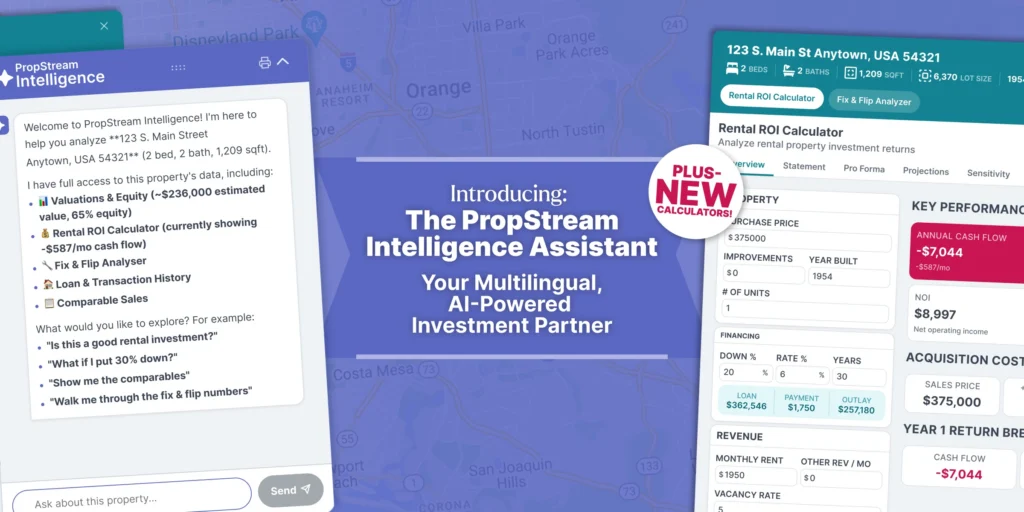
One reason some investors may decide to stay with PropStream is that it has expanded beyond basic list pulling with a new Intelligence Assistant for AI-powered property analysis, plus Rental ROI and Fix & Flip calculators. If your workflow benefits from combining lead research with faster deal evaluation, that makes PropStream a stronger stay-with-it option than before.

Also see: PropStream Pricing


Suggested stacks (what I’d run)

Starter stack (solo investor)

Why this wins: it separates lead sourcing from lead conversion, which is how most real operators scale.


Growth stack (team + consistent outbound)

Why this wins: volume acquisition only works if follow-up is systemized and tracked.


FAQs

What is the best PropStream alternative overall?

It depends on workflow. For outbound scale, BatchLeads is often the closest “all-in-one” alternative. For D4D, DealMachine is usually the cleaner field system. For follow-up execution, REsimpli is the best “conversion lever.”

Is PropStream only for list pulling?

No — it’s commonly used for investor research plus pulling targeted lists. But many investors pair it with a CRM or outbound system for execution.

Which alternative is best for virtual driving / multi-market?

If you’re building a VA-led acquisition engine across markets, you typically want a platform designed around filtering + list workflows + campaigns (often BatchLeads-style).

Can I use PropStream and REsimpli together?

Yes — that’s a very common operator setup: source leads in PropStream, then work and track leads in REsimpli.

Should I switch away from PropStream if I’m not getting deals?

Only if the tool is the bottleneck. Most of the time, the bottleneck is follow-up consistency, not “more data.” Tighten your process first.


Sources:

PropStream Pricing (2026): Which Plan Should Real Estate Investors Buy?

Intro

If you are comparing PropStream pricing, the main decision is not whether the platform has useful data. The real decision is which plan gives you enough list capacity for your acquisition workflow without paying for more than you will actually use.

For most investors, the right choice comes down to three things:

  • how often you pull and export lead lists
  • whether you are working solo or with a team
  • how much monthly list volume you really need

That is why this guide is focused on plan selection, not a general review of the platform.

Below, I’ll break down Essentials vs Pro vs Elite, who each plan makes sense for, and when it is smarter to stay lean versus upgrade for more capacity.

If you are still deciding on the right lead gen tool go to our guide on the Best AI Lead Generation Software for Real Estate Investors (2026).

Disclosure: Some links on this page are affiliate links, which means we may earn a commission at no extra cost to you. I only recommend tools I’d use to run an investor deal flow. See our Affiliate Disclosure: /affiliate-disclosure/


Quick verdict

Most real estate investors should choose the lowest PropStream plan that supports consistent weekly list pulling and analysis. The new AI-powered Intelligence Assistant plus Rental ROI and Fix & Flip calculators make PropStream more compelling if you plan to use it for both lead research and faster deal evaluation.

My take by plan:

  • Essentials: best for solo investors and smaller operators validating list-based outreach
  • Pro: best fit for investors running consistent outbound and needing more working room
  • Elite: only makes sense for larger teams or higher-volume operations that will actually use the extra capacity

Bottom line: PropStream pricing makes sense when your acquisition process is active enough to turn list capacity into conversations and deals.


PropStream Pricing: Essentials vs Pro vs Elite

PlanMonthly price (monthly billing)Monthly price (annual billing)Best forMonthly saves/exports (limit)Team accessMy take
Essentials$99/mo$81/mo billed annuallySolo investors validating list criteria25,000/monthSolo-focused (team add-ons/upgrade path)Best starter plan until you pull/export weekly at volume
Pro$199/mo$165/mo billed annuallyConsistent outbound + higher throughput50,000/monthIncludes 2 full-access team members (expandable)Best value for serious investors running weekly outbound
Elite$699/mo$583/mo billed annuallyTeams + high-capacity ops100,000/monthIncludes 9 full-access team membersOnly worth it when PropStream is a central team system

How to choose the right PropStream plan

  • If you mainly need search + light list pulls + occasional exports, Essentials is fine.
  • If you’re doing consistent list building + outbound (weekly), Pro usually pays for itself in speed + capacity.
  • If you’re managing a multi-user team inside PropStream and exporting at scale, Elite is built for that.

If you want the full feature and fit breakdown before choosing a plan, see our PropStream review.


Do the new AI tools make PropStream pricing more compelling?

Potentially, yes — especially if you are using PropStream for more than just list pulling.

PropStream recently added a new Intelligence Assistant for AI-powered property analysis, along with:

  • a Rental ROI Calculator
  • a Fix & Flip Analyzer

That matters because the pricing decision is no longer only about list capacity and exports. It is also about whether you will actually use PropStream as a faster research + analysis + decision tool inside your acquisition workflow.

PropStream Intelligence Assistant with rental ROI calculator and fix and flip analyzer for real estate investors
PropStream’s new Intelligence Assistant adds AI-powered property analysis plus Rental ROI and Fix & Flip calculators.

If you are the kind of investor who wants to:

  • pull leads
  • ask deal-specific questions
  • estimate rental performance
  • evaluate flip margins
  • and move faster from research to action

…then these additions make the platform easier to justify.

If you mainly want basic list pulling and do not expect to use the AI assistant or analysis tools, then the extra value is lower, and it becomes even more important not to overbuy your plan too early.


Plan-by-plan breakdown

Essentials plan

Price: $99/month (monthly) and a discounted annual option shown on PropStream’s pricing page.
Best for: solo investors who are still proving their list strategy

What Essentials is best at:

  • Getting you into PropStream with enough capacity to start building lists and testing markets
  • Running a simple weekly rhythm: search → filter → save/export → outreach

When Essentials becomes the bottleneck:

  • You’re exporting constantly
  • You need multiple people working the same lead pipeline
  • You’re scaling outbound and don’t want to throttle lead volume

Pro plan

Price: $199/month (monthly) and discounted annual option shown on PropStream’s pricing page.
Best for: investors doing consistent outbound who want more capacity + smoother execution

Operator take:
If you’re actually running outbound weekly (or daily), Pro is usually the best balance of cost vs throughput. It’s the plan that fits the “I’m serious about pipeline” stage.


Elite plan

Price: $699/month (monthly) and discounted annual option shown on PropStream’s pricing page.
Best for: teams that need high capacity and multiple full-access users

Operator take:
Elite is for when PropStream is a core system in a bigger operation — not just a tool you log into twice a month.

Not sure PropStream is worth it for your deal flow? Compare the top PropStream alternatives (by workflow + budget) → /propstream-alternatives/


What changes most between plans (the stuff that actually matters)

1) Monthly saves/exports (your lead throughput)

The plans scale your monthly capacity, which matters if you’re pulling lists regularly and exporting them for skip tracing/outreach or CRM follow-up.

Rule of thumb: if you’re throttling list pulls because you’re worried about hitting limits, it’s time to upgrade.


2) Team workflow

If you’re solo, team features don’t matter. If you have a VA, acquisition manager, or partner who needs access, the team support becomes a real lever. PropStream’s plans differ on included team members and expansion options.


3) Your “full system” matters more than the plan

PropStream can be your lead source, but your results usually come from what you do next:

  • PropStream (sourcing + list building)
  • Outbound system (dial/text/mail)
  • CRM follow-up (to close deals reliably)

If you need the follow-up layer, start here: Best AI CRM for real estate investors/best-ai-crm-real-estate-investors/

After list pulling, consistent follow-up closes deals—REsimpli review → /resimpli-review/

After you pull lists, your results depend on follow-up—use this AI CRM setup (8 steps)/ai-crm-setup-real-estate-investors/


Which PropStream plan should you buy?

Buy Essentials if…

  • You’re solo and still validating your list criteria
  • You pull lists occasionally (not daily)
  • You want the lowest cost entry point and you’re okay upgrading later

Buy Pro if…

  • You’re doing consistent outbound and need more capacity
  • You want smoother execution and less “limit anxiety”
  • You’re building a repeatable weekly pipeline

Buy Elite if…

  • You’re operating with a team and need multiple full-access users
  • You’re exporting at scale and PropStream is central to your ops

After you buy a plan, execution matters: Pair it with this follow-up cadence so lists don’t go cold: /ai-follow-up-sequence-real-estate-investors/


FAQs

Is PropStream worth it for beginners?

Yes — if you’re actually going to use it weekly. If you won’t pull lists and contact leads consistently, the tool won’t save you.

Can I start on Essentials and upgrade later?

Yes. Most investors should start on Essentials, prove their workflow, then upgrade when capacity becomes the bottleneck.

Does annual billing save money?

PropStream shows discounted annual pricing vs monthly on their pricing page.

Should I use PropStream or BatchLeads?

If you’re choosing between them, use this comparison: /propstream-vs-batchleads/


Sources:

BatchLeads Review (2026): Best for Virtual Canvassing + List Building?

BatchLeads Review (2026): Best for Virtual Canvassing + List Building?

BatchLeads is positioned as an “all-in-one lead platform” for real estate investors: property search, list building, skip tracing, outreach campaigns, and pipeline-style CRM tools—plus virtual driving for dollars for multi-market sourcing.

The real question isn’t “is BatchLeads good?” It’s: does your business model need scale sourcing + outbound, or do you mainly need a simple local D4D workflow?

In this review, I’ll break down who BatchLeads is best for, what it does well, where it falls short, and how to decide if it’s worth the monthly spend.

If you’re deciding between field D4D vs scale sourcing, start here: DealMachine vs BatchLeads/dealmachine-vs-batchleads/
If you want the “best tool by use-case” view: Best AI lead gen software/best-real-estate-lead-generation-software-ai/

Disclosure: Some links on this page are affiliate links, which means we may earn a commission at no extra cost to you. I only recommend tools I’d use to run an investor deal flow. See our Affiliate Disclosure: /affiliate-disclosure/


BatchLeads Review: Quick verdict

BatchLeads is best for investors who want scale: virtual canvassing across markets, list stacking, skip tracing + outbound, and one platform to organize campaigns and pipeline.

Skip BatchLeads if: you only do occasional lead pulls, you’re strictly boots-on-the-ground D4D, or you already have a separate list + dialer + CRM stack that you love.


Next Steps:


What BatchLeads is (and what it’s not)

BatchLeads is primarily a lead acquisition and outbound operations platform—not a full “investor CRM” in the same sense as REsimpli or HubSpot.

Think of it like this:

  • BatchLeads = source + build lists + skip trace + run outreach + manage simple pipeline
  • Dedicated CRM = deeper automation + long-term follow-up + deals/transactions + team SOPs

If you’re serious about converting, your “secret weapon” is still follow-up. Start here:
Best AI CRM for real estate investors/best-ai-crm-real-estate-investors/


BatchLeads pros and cons (operator view)

Pros

  • Strong virtual driving / multi-market workflow (great for VA-led sourcing)
  • List building + filtering is the core use-case
  • Skip tracing + outreach features support a lists → contact → follow-up machine
  • Useful when your priority is volume outbound and speed to contact

Cons

  • Can be “too much tool” if you’re early-stage or only do a little outbound
  • Built-in pipeline tools may not replace a real CRM once you grow
  • Your ROI depends on execution: lists + trace + outreach + consistent follow-up

Best for (and not best for)

BatchLeads is best for:

  • Virtual canvassing / expansion markets
  • List stacking + outbound (SMS/calls) style operations
  • Teams using VAs to source leads across multiple zip codes/counties

If you’re scaling outbound, use this AI CRM setup checklist (8 steps) to keep leads organized and followed up → /ai-crm-setup-real-estate-investors/

BatchLeads is not best for:

  • Investors doing mostly boots-on-the-ground D4D (DealMachine is often cleaner)
  • Investors who want the CRM to be the “system of record” (look at REsimpli / HubSpot)
  • People who won’t run consistent outbound (you’ll underuse the platform)

If you’re deciding on the D4D side, compare:
Best driving for dollars app (AI)/best-driving-for-dollars-app-ai/


Core features (what matters in real life)

1) Virtual driving + multi-market sourcing

If you want to scale beyond your local market, BatchLeads is built for the “virtual sourcing” shape of business. You can operate with a VA team tagging leads, filtering for distress signals, and building call/text lists.

If your lead generation model is “cover more ground faster,” this is where BatchLeads shines.

Compare: DealMachine vs BatchLeads → /dealmachine-vs-batchleads/

Related: Best driving for dollars app (AI) → /best-driving-for-dollars-app-ai/

2) List building + filtering (the main reason to buy)

BatchLeads is strongest when you treat it as a list engine:

  • build lists by geography + property criteria
  • refine for likely distress signals
  • stack lists (your best filters over time)
  • export or work inside platform depending on workflow

If your interested in other Real Estate AI tools and automations go to:
Best AI tools for real estate investors/best-ai-tools-real-estate-investors/

3) Skip tracing + outreach

BatchLeads pitch is “one platform”—you build lists, then contact them.

Operator reality: your results depend on:

  • list quality
  • speed to contact
  • number of touches
  • follow-up consistency

If you’re doing outbound at scale, follow-up is the multiplier: Here’s the exact 7/14/30-day sequence we use: /ai-follow-up-sequence-real-estate-investors/

Follow-up is where most deals are won. If you want a plug-and-play system for texts, calls, and task reminders, see my guide to the best AI CRM for real estate investors: /best-ai-crm-real-estate-investors/.

4) Pipeline / CRM-style tools

BatchLeads can handle basic organization and pipeline. But if you’re growing a real operation, you’ll often graduate into:

  • REsimpli (investor-first CRM + automations)
  • HubSpot (more flexible marketing + automation stack)

If you want a dedicated CRM beyond the built-in workflow, see my REsimpli review → /resimpli-review/

If you want the CRM comparison:
REsimpli vs HubSpot/resimpli-vs-hubspot/

Also See: Best AI CRM for real estate investors → /best-ai-crm-real-estate-investors/


Pricing (how to think about ROI)

BatchLeads is a monthly operating expense. The only correct question is:

“How many deals per month do I need to justify it?”

A simple operator model:

  • If you consistently run outbound (weekly or daily)
  • If you have someone building lists + launching campaigns
  • If your pipeline isn’t empty

…then the platform can pay for itself quickly.

If your outbound is inconsistent, you’ll probably underuse it.


Starter stack (solo investor)

Growth stack (team + consistent outbound)

  • BatchLeads for list building + skip tracing + outreach + pipeline
  • Layer a dedicated CRM when:
    • leads are living too long without touches
    • multiple team members handle follow-up
    • you want automations + reporting

For the “tool stack by stage” view: Best AI Tools for Real Estate Investors (2026)


Who should buy BatchLeads (decision checklist)

Buy BatchLeads if:

  • you want multi-market sourcing
  • you will build lists weekly
  • you will run consistent outbound
  • you prefer “one platform” over stitching tools together

Skip (or delay) if:

  • you’re not going to run outbound consistently
  • you primarily do local D4D (consider DealMachine)
  • you already have a working list + outreach + CRM system

Compare against local D4D leader:
DealMachine vs BatchLeads/dealmachine-vs-batchleads/


FAQ

Does BatchLeads support driving for dollars?
Yes—BatchLeads promotes both D4D and virtual driving workflows, with a mobile workflow for route-based sourcing.

Is BatchLeads a full CRM?
It has pipeline-style tools, but most teams eventually use a dedicated CRM for long-term follow-up and automations. Start here: /best-ai-crm-real-estate-investors/

Is BatchLeads best for multi-market acquisitions?
Yes—this is one of its clearest strengths compared to more “local-first” tools.

Can I use BatchLeads with another CRM?
Yes—common operator setup is BatchLeads for sourcing + a CRM for follow-up.


Final Conclusion

If you’re building a virtual canvassing + outbound machine, BatchLeads is one of the cleanest “one platform” options.


Sources:

DealMachine Pricing (2026): Which Plan Should You Buy?

DealMachine Pricing

If you are comparing DealMachine pricing, the main question is not which plan has the most features. The real question is which plan fits your driving-for-dollars workflow without paying for more than you will actually use.

For most investors, the decision comes down to:

  • whether you are driving consistently each week
  • whether you are working solo or with a team
  • whether you need DealMachine mainly for lead capture or as part of a broader outreach process

That is why this guide is focused on plan choice and buying logic, not just feature lists.

Below, I’ll break down which DealMachine setup makes the most sense for solo investors, small teams, and operators who want the simplest path from “see a property” to “work the lead.”

Best fit for investors running consistent local driving for dollars

Disclosure: Some links on this page are affiliate links, which means we may earn a commission at no extra cost to you. I only recommend tools I’d use to run an investor deal flow. See our Affiliate Disclosure: /affiliate-disclosure/


Quick verdict

Most real estate investors should buy the cheapest DealMachine plan that supports consistent weekly driving for dollars. Paying for more features too early usually does not improve ROI.

My take by use case:

  • Solo investor: start lean if your main goal is route tracking, property capture, and basic lead organization
  • Small team: upgrade when shared workflows, handoffs, and accountability actually become necessary
  • Higher outbound volume: use DealMachine for sourcing if D4D is core, but do not assume it replaces a full outreach or CRM stack

Bottom line: DealMachine pricing makes the most sense when local driving for dollars is a real part of your acquisition strategy. If your business is more list-based or multi-market, another stack may fit better. This sharpens the page’s main decision logic compared with the current version, which already emphasizes workflow fit, solo vs team usage, and D4D-first execution.

If you are still deciding on the tool itself, start here: DealMachine review

If you’re driving weekly, this is the fastest “see it → add it → work it” workflow.


How to choose the right DealMachine plan

The right DealMachine plan depends less on feature checklists and more on how you actually source leads.

If your business is built around:

  • driving neighborhoods consistently
  • pinning likely distressed or vacant properties
  • organizing leads as you go
  • and following up quickly after capture

…then DealMachine can be worth paying for.

If you are not doing those things regularly, a higher-tier plan will not fix the underlying issue. Most investors do not need more software. They need a more consistent sourcing routine.

So the real buying question is:

Do you need DealMachine to support a simple solo D4D workflow, or do you need it to support multiple people and more operational complexity?


DealMachine plans (2026): what you get

Plan/TierBest forWhat you get (operator view)Watch-outsBuy if you…
Entry / StarterSolo investor starting D4DRoute discipline, fast pin-to-work workflow, basic organizationYou may outgrow if volume/teammates increaseDrive weekly in one market and just need consistent capture + follow-up
Team / Pro (multi-user)2–5 person teamShared leads, cleaner handoffs, scaling routes + accountabilityPaying more doesn’t fix follow-up; you still need SOPsHave multiple drivers/VA and need shared tags/notes + consistent execution
Add-ons (skip trace/mail)Outbound actionsContacting owners inside the workflowCosts can spike if you trace/mail everythingOnly turn on once your lead filter is dialed in
Best-value setup (most investors)Local D4D + simple follow-upDealMachine for capture + your CRM for sequencesTwo-system stack requires disciplineWant maximum ROI without pretending one tool does everything

What you’re actually paying for

DealMachine pricing is not really about software complexity. You are mostly paying for a smoother path from spotting a property to taking action on it.

That usually means:

Route tracking and repeatable coverage

If you are driving the same neighborhoods consistently, clean route history helps prevent wasted drives, duplicate effort, and missed streets.

Frictionless lead capture

The real value is in being able to:

  • see a property
  • pin it quickly
  • identify the owner
  • add notes
  • and decide what happens next

…without losing momentum.

Shared execution for teams

Once more than one person touches the workflow, the value shifts toward:

  • lead visibility
  • clean handoffs
  • shared notes
  • and accountability

Optional outreach actions

Some investors use DealMachine mainly for capture and tracking, then handle follow-up elsewhere. Others want mail, skip tracing, or owner contact actions inside the same workflow.

That does not mean you should pay for every add-on immediately. Most investors get better ROI by tightening their lead filter first, then adding outbound costs later.

If your follow-up is the bottleneck, read: Best AI CRM for real estate investors/best-ai-crm-real-estate-investors/


Which DealMachine plan should you buy?

Best plan for solo investors

If you are a solo investor doing local driving for dollars in one market, start with the plan that gives you:

  • route tracking
  • reliable property notes and tags
  • enough workflow support to capture and work every lead you pin

You usually do not need to overbuy here.

The biggest mistake is paying for team or expansion features before you have a weekly D4D habit. A simple setup executed consistently will outperform a bigger plan that you only use occasionally.

Default recommendation: start one tier lower than you think you need, then upgrade only when your actual workflow forces the decision.

Start lean, upgrade only when volume forces it.


Best plan for small teams

If you have:

  • multiple drivers
  • a VA or acquisitions support
  • shared lead lists
  • and a need for cleaner handoffs

…then the multi-user value becomes more important.

At that point, prioritize:

  • shared workflows
  • permissions if available
  • clean note-taking
  • tagging consistency
  • visibility into who is doing what

The upgrade is worth it when it removes execution friction for the team. It is not worth it if you are hoping a more expensive plan will solve weak follow-up discipline.

If you have:

  • multiple users,
  • shared lead lists,
  • and you need clean handoffs,

then prioritize:

  • multi-user workflows,
  • permissions,
  • and consistent tagging/notes.

If you’re building a team outbound machine, compare: DealMachine vs BatchLeads.


When to keep DealMachine simple

A lot of investors get the best ROI from DealMachine by using it for exactly what it does well:

  • local lead capture
  • route discipline
  • basic organization
  • identifying who to follow up with next

That means you may not need to force it into being your:

  • all-in-one CRM
  • full outbound hub
  • team operating system
  • or multi-market list platform

For many investors, the best setup is:

  • DealMachine for field sourcing
  • a separate CRM for follow-up
  • another tool only when scale truly requires it

That is usually a better buying strategy than trying to make one platform do everything.


When to pair DealMachine with a CRM

If you are using a separate CRM or follow-up system, keep DealMachine focused on sourcing and lead capture.

Then move the lead into your:

  • follow-up pipeline
  • texting or calling workflow
  • task system
  • nurture sequence

This is often the highest-ROI setup because it lets each tool do its main job well.


If you’re choosing a CRM to manage leads after D4D, read my REsimpli review

Most investors fail here because they don’t follow up fast enough. Start here: 7 follow-up automations checklist


When DealMachine is the wrong tool

DealMachine pricing only makes sense when driving for dollars is a real part of your acquisition strategy.

It may be the wrong fit if:

  • you rarely drive in person
  • your lead gen is mostly list-based
  • you operate across multiple virtual markets
  • your main bottleneck is CRM and follow-up, not sourcing
  • you need a larger outbound engine more than a field-capture app

In those cases, a list-pulling or CRM-first stack may be the better buy.

If your lead source includes list building, compare: Best real estate lead generation software (AI)

Not sure you want DealMachine at all? Compare the top DealMachine alternatives


Common setups (what I would run)

Starter stack (solo investor)

  • DealMachine for local driving for dollars sourcing and route tracking
  • simple follow-up system or lightweight CRM

Related guide: Best driving for dollars app (AI)

Growth stack (consistent outbound)

  • DealMachine for field capture if D4D is core
  • a platform built for scale outreach if needed
  • a CRM once lead volume becomes consistent

If your lead source includes list building, compare: Best real estate lead generation software (AI)


FAQs

Does DealMachine have a free trial?
Sometimes—check current availability here: /go/dealmachine

Can I use DealMachine without skip tracing or mail?
Yes. Many investors use it for route tracking + lead capture and run skip trace/outreach elsewhere.

What’s the biggest mistake with DealMachine pricing?
Buying a higher plan before you have consistent D4D volume. Your ROI comes from executing weekly, not features.

Should I use DealMachine if I’m doing virtual driving for dollars?
It can work, but if you’re building a multi-market VA workflow, compare it against BatchLeads first: /dealmachine-vs-batchleads/


Final recommendation

Choose the cheapest DealMachine plan that fully supports your current driving-for-dollars workflow.

If you are:

  • driving consistently each week
  • working mostly local leads
  • and need the cleanest route-to-lead workflow

…DealMachine can be worth it.

If you are:

  • building a larger list-based acquisition machine
  • working multiple virtual markets
  • or need stronger CRM automation

…you may be better off pairing DealMachine with other tools or choosing a different stack entirely.


Sources:

DealMachine official site