PropStream Review (2026): Is It Actually Worth It for Real Estate Investors?


If you are considering PropStream, you probably are not just looking for property data. You are trying to answer a more practical question:
Can this tool actually help me find better off-market leads and turn them into conversations faster than my current workflow?
That is what this review is here to answer.
PropStream is one of the better-known tools in real estate investing for list building, property research, comps, and skip tracing. But that does not automatically make it the right choice for every investor. In practice, it tends to work best for operators who already know their buy box, pull targeted lists consistently, and need a faster path from lead research to outreach.
For beginners, or for investors who mainly need a CRM or a simpler driving-for-dollars workflow, it can be more platform than they actually need.
In this review, I’ll break down where PropStream fits best, where it falls short, and whether it deserves a place in your acquisition stack in 2026.
Quick verdict: PropStream Review
PropStream is best for real estate investors who want one platform for list building, comps, skip tracing, and faster first-pass deal analysis. With the new PropStream Intelligence Assistant plus Rental ROI and Fix & Flip calculators, the platform is more useful for investors who want to move from lead research to deal evaluation without switching tools constantly.
Best for:
- wholesalers pulling motivated seller lists
- flippers who need list building plus fast comps
- buy-and-hold investors sourcing off-market opportunities
- acquisition teams that work records at scale
Not ideal for:
- beginners still figuring out their acquisition process
- investors who mainly need CRM and follow-up automation
- operators who mostly want a simple driving-for-dollars app
My take: PropStream is strongest when your business depends on targeted lead pulling and quick analysis of whether a deal is worth pursuing.
Disclosure: Some links on this page are affiliate links, which means we may earn a commission at no extra cost to you. I only recommend tools I’d use to run an investor deal flow. See our Affiliate Disclosure: /affiliate-disclosure/
Who should seriously consider it
- Investors building targeted off-market lists
- Wholesalers running consistent outbound outreach
- Small acquisition teams that want research + contact workflows in one system
- Investors who care about comps and lead filtering, not just driving for dollars
Who may want something else
- Investors who mainly want a simpler driving-for-dollars workflow
- Teams that already have a CRM and only need one narrow data function
- Beginners who are not yet ready to work filtered lists consistently
If PropStream feels too data-heavy for your workflow, check our list of PropStream alternatives.
What PropStream does well
The core strength of PropStream is workflow compression.
Instead of using one tool for data, another for comps, another for skip tracing, and another for list maintenance, PropStream tries to keep those steps connected. Officially, it offers nationwide property data, lead generation tools, comps, calculators, demographic data, AI-driven features, skip tracing, emails, landing pages, and more.
That matters because real estate lead generation usually breaks down in the handoff between steps. You pull a list, export it, clean it, upload it somewhere else, then lose momentum before the actual outreach starts.
PropStream is strongest when you use it to reduce that friction.
1. List building is still the main attraction
If your acquisition strategy depends on absentee owners, pre-foreclosures, distress signals, equity, liens, vacancies, or similar targeting logic, PropStream is built for that kind of filtering. Its positioning is still centered on helping users find off-market property leads and build curated lead lists.
That makes it a better fit for investors who think in terms of:
- “Show me likely motivated sellers”
- “Let me narrow by geography, equity, ownership profile, and distress”
- “Give me a list I can actually work this week”
2. The comps and research angle adds real value
A lot of lead-gen tools help you build lists. Fewer make it easy to move directly into property research and comping without changing systems.
PropStream explicitly markets comps, calculators, and research tools as part of the same workflow, which is why it often appeals to flippers and investors who do more than just blast lists.
That makes the platform more useful when you want to:
- validate whether a lead is worth chasing
- estimate opportunity before contacting the owner
- quickly underwrite markets or neighborhoods
- keep acquisition decisions closer to the data
3. Skip tracing is more integrated than it used to be
One of the more important current advantages is how central skip tracing has become inside PropStream’s workflow. PropStream says skip tracing is now built directly into platform workflows, with features like DNC flagging and litigator scrubbing. It also says some plans include free skip tracing, while Essentials users may pay per contact.
For investors doing real outreach, this matters more than flashy dashboard features.
You do not just need leads. You need contactable leads.
So if your business model relies on:
- cold calling
- SMS outreach
- repeated seller follow-up
- list-to-dial speed
…then PropStream becomes more compelling.
4. It increasingly supports lead-to-dial workflows
PropStream recently added or expanded dialing-related workflows and has public messaging around moving users from lead research to live conversations faster. It also promotes integrations and discounts tied to BatchDialer for users who want higher-volume outbound calling.
That does not mean it is automatically your best dialing stack. But it does mean the product is clearly moving toward a more complete acquisition workflow rather than staying just a static property-data tool.
Where PropStream can fall short
No tool is best at everything, and PropStream has tradeoffs.
1. It works better for operators than dabblers
If you are not consistently pulling lists, researching opportunities, or doing outreach, PropStream can feel like more platform than you need.
This is not really a casual “log in once a month” type of product. You get the most value when you already know:
- what kind of sellers you want
- what filters matter to your model
- how you plan to follow up
- how to turn lead data into offers or conversations
2. It is not a full investor operating system
PropStream is strongest on the front end of acquisition: data, filtering, research, list creation, and contact workflows. If you want deep CRM automation, pipeline management, and team follow-up systems, an investor-first CRM may still be the better core hub.
In plain English: PropStream is often the engine for finding leads, not necessarily the entire machine for managing every deal stage.
3. You still need execution
This sounds obvious, but it matters.
Tools like PropStream do not create deals. They create better shots on goal.
If your lists are weak, your outreach is inconsistent, or your follow-up is poor, the platform will not magically fix that. The investors who get the most from PropStream are usually the ones who already have:
- a list strategy
- a repeatable outreach process
- a clear acquisition box
- discipline around follow-up
If you want a broader overview of software options, start with our guide to the best AI lead generation software for real estate investors.
Best fit by investor type
Best for wholesalers
PropStream is a strong fit for wholesalers who want to pull niche motivated-seller lists, comp properties quickly, and move those records into outreach.
Best for flippers
Flippers who rely on equity, distress, and neighborhood-level research can benefit from having list filtering and comping in the same place.
Best for buy-and-hold investors
Buy-and-hold investors can still use PropStream well, especially when sourcing off-market rentals or small portfolios. But the platform tends to be strongest for investors with a more active acquisition engine.
Best for small acquisitions teams
If you have a VA, acquisitions rep, or small in-house lead pipeline, PropStream is more compelling because the tool can support a more repeatable list-to-contact workflow.
Key features that matter most
For investors, the most meaningful feature set is not the marketing language. It is whether the tool helps you move through the deal-finding process faster.
The features that matter most here are:
- targeted lead list building
- property data and research
- comps
- calculators
- demographic insights
- skip tracing
- contact workflows
- AI-enhanced features
- lead automation options
- trial access to test workflow fit
Those are all areas PropStream currently highlights across its official product and feature pages.
What’s new: PropStream Intelligence Assistant + Deal Analysis Calculators
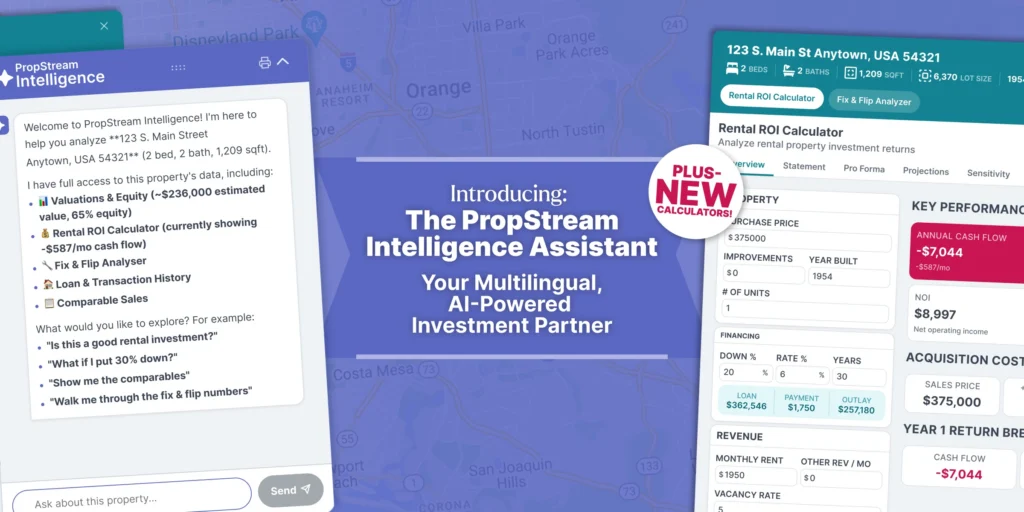
One of the more interesting recent additions inside PropStream is the new PropStream Intelligence Assistant, which pushes the platform further into AI-assisted deal analysis instead of just property search and list building.
According to PropStream, investors can now ask property-specific questions directly inside the platform and get real-time answers related to:
- ARV
- equity
- comps
- and other deal-analysis questions
It also adds:
- real-time streaming responses
- multilingual support
- a new Rental ROI Calculator
- a new Fix & Flip Analyzer
For investors, this matters because it shortens the gap between research and decision-making.
Instead of only pulling records and lists, users can now move more quickly into questions like:
- Does this property look like a realistic flip?
- What does the rental upside look like?
- Is there enough spread here to keep digging?
- What does this deal look like after rehab and holding assumptions?
That does not automatically make PropStream the best tool for every investor. But it does make the platform more compelling for operators who want lead generation plus faster first-pass deal analysis in one workflow.
Pricing fit
PropStream currently offers tiered pricing and a 7-day free trial, and it markets different plan levels around access to lead generation tools, curated data, and skip tracing benefits. It also states that free skip tracing is included on select plans, with different treatment for Essentials depending on add-ons or per-contact usage.
That means the real pricing question is less “Is PropStream cheap?” and more:
Will I use it enough to justify another monthly operating expense?
For many investors:
- Yes, if you actively pull and work lists
- Maybe not, if you only need occasional property lookups or you already pay for overlapping tools
If you’re comparing monthly costs, see our PropStream pricing guide.
Pros and cons
Pros
- Strong fit for off-market list building
- Useful combination of data, comps, and contact workflows
- Better than narrower tools for investors who want multiple acquisition steps in one place
- Skip tracing and lead-to-dial workflow are becoming more central
- Good fit for active lead generation teams
- 7-day free trial lowers testing risk
Cons
- Can be more tool than a beginner needs
- Best results still depend on strong outreach execution
- Not the same thing as a full investor CRM
- May overlap with other tools if your stack is already mature
PropStream vs other tools: where it sits
Here is the simplest way to think about it:
- Choose PropStream if you want a broad investor data and list-building platform with comps and skip tracing
- Choose a driving-for-dollars-first tool if your workflow starts on the road more than in filtered data
- Choose an investor CRM first if your biggest bottleneck is follow-up, pipeline visibility, and automation after leads are already coming in
That is why PropStream often works best as either:
- your main acquisition data tool, or
- the front-end lead source feeding the rest of your system
If you’re choosing between list-building depth and a field-first workflow, read DealMachine vs PropStream.
If you’re deciding between two list-pulling platforms, see PropStream vs BatchLeads.
My verdict
PropStream is one of the better fits for real estate investors who need list building, property research, comps, and skip tracing in one platform. Its official product positioning is still heavily centered on being an all-in-one lead generation, comping, and marketing solution, and recent product updates show continued focus on outreach speed and integrated skip tracing.
It is not the best choice for every investor.
But if your acquisition model depends on identifying motivated sellers, narrowing lists intelligently, validating opportunities, and contacting owners fast, PropStream deserves to be on your shortlist.
For the right operator, it can reduce tool sprawl and tighten the gap between “I found a lead” and “I started the conversation.”
Final recommendation
Try PropStream if:
- you actively build and work seller lists
- you want comps and lead data in one place
- skip tracing matters to your workflow
- you want a more complete acquisition tool than a narrow single-purpose app
Skip it if:
- you want a simpler beginner tool
- you mostly need CRM automation
- your current stack already covers data, list building, and outreach well
If your business is built around targeted lead generation, PropStream is a legitimate contender.
Table of Contents
Sources:
- PropStream official site